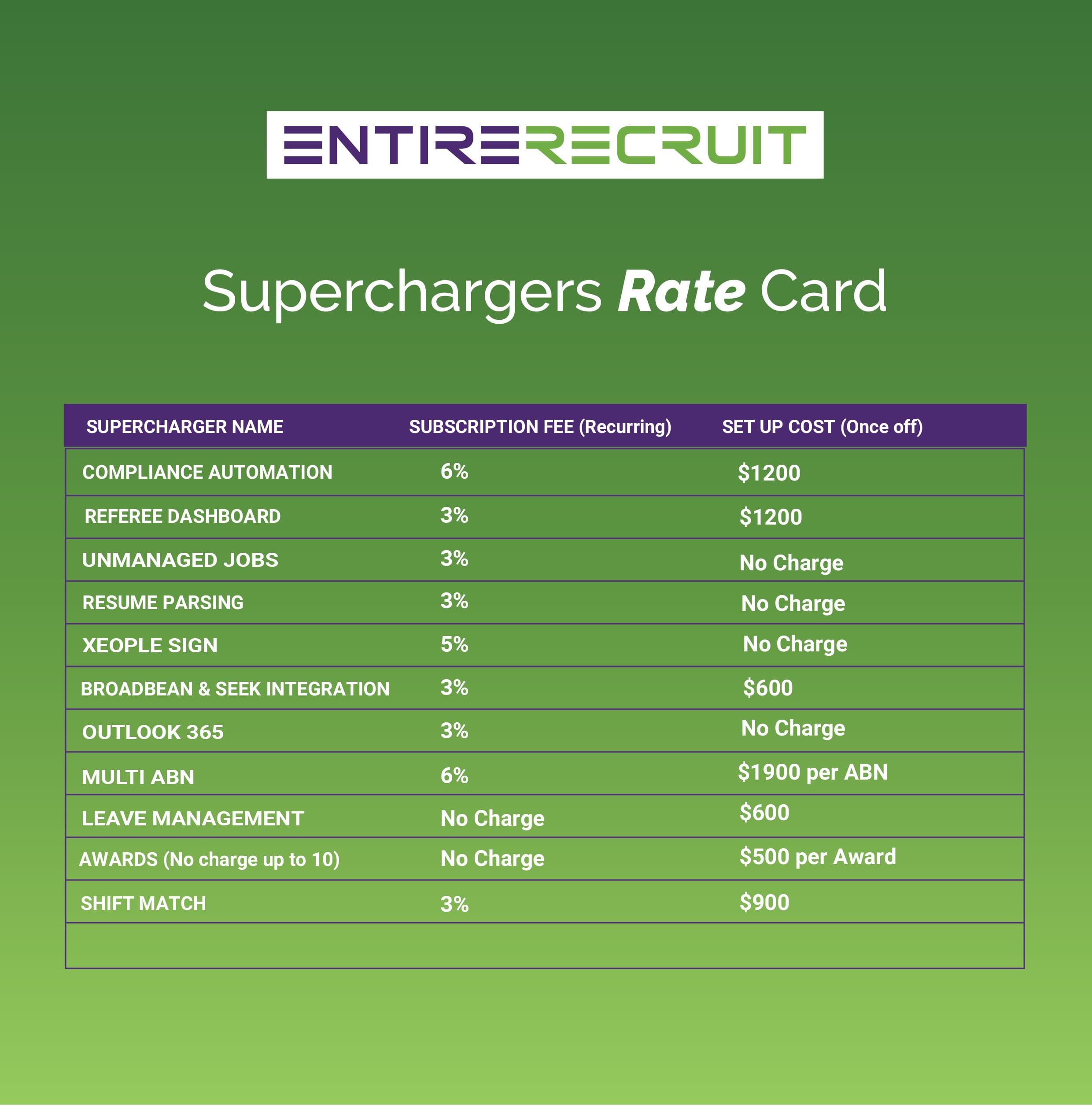
Standard pricing consists of 2 parts I.e. one time implementation and per user licence. There are 4 options available:
| Options | Inclusions | Details |
|---|---|---|
| Standard Pricing | No Superchargers | Includes Implementation & Monthly Subscription with 5% Indexation annually |
| No Term Contract | Includes Implementation, Superchargers & Monthly Subscription | 5% Indexation annually |
| Subscription Term Contract | Superchargers with Paid Implementation upfront | 3 Year - 2.5% Indexation or 5 Year - 0% Indexation |
| Subscription & set up term Contract | Superchargers with Monthly Subscription | 3 Year - 2.5% Indexation or 5 Year - 0% Indexation |
Entire is currently building out a dedicated Client Management program which includes dedicated client managers including routine meeting schedules. This tailored client service feature will be at a tiered expense.
| Standard | Mid | Premium | Elite |
|---|---|---|---|
| $0 | $900 Per month | $2200 Per month | $5000 |
| Included in standard subscription | All in standard | All in Mid-level | All in premium |
| Annual system upgrade free of charge | Dedicated account manager (junior) | Dedicated account manager (senior) | Senior executive level account manager (CEO, CTO, Client Engagement Manager) |
| Group Walkthrough of recent version updates Q & A – 30 minutes | Fortnightly 1hr (Zoom) client engagement session with account manager | Fortnightly 1hr (Zoom) client engagement session | Optional Monthly face to face meeting in client office/space $2,500.00 (note travel & accommodation expenses may apply) |
| Webinars | Review of current support tickets | System operations | |
| In system tips, help, hints & process step throughs | General feedback, system requests & process updates | Process review | |
| Issues and help via support portal and ticketing process | Highlight feature requests and system improvements | Support ticket review & resolutions | |
| Annual system review | Bi-annual system review & optimisation session (2hrs - Zoom) with account manager review of system and processes to highlight current capacity and highlight potential system & process efficiency gains | Optional Monthly face to face meeting in client office/space $1750.00 (note travel & accommodation expenses may apply) | |
| Review of development roadmap & future product concepts and development | |||
| Provide direct feedback on current system features, future development features |
Additional options - applicable for all support levels upon availability
| 1 Zoom & Training sessions: | Investment |
|---|---|
| Level 1 Support consultant- | $100/hr |
| Level 2 Support consultant- | $150/hr |
| Account manager (junior)- | $200/hr |
| Technical support specialist (e.g finance) | $350/hr |
| Senior account manager | $450/hr |
| Executive level | $750/hr |
| 2 Priority Support | |
|
Level 1
|
$500/week |
|
Level 2
|
$750/week |
|
Level 3
|
$1000/week |
| 3. Cappa Client Feature | |
|
$2500 / feature |
Note all prices listed above are GST exclusive
Content is coming soon...
| i. IT Support & Training | Description | Rate |
|---|---|---|
| Business Hours Support | Phone / Remote Access (prescheduled only) | Free |
| Silver Service Level Agreement | Free | |
| 24/7 Support via Integrated Support Portal | Free | |
| Calls (ad hoc) | Outside Business Hours Support by Phone / Remote Access* | $140 -Per Call |
| Training | $250-Per hour | |
| Customer Lifetime Access to Training Videos | (Recorded during your training) | Free |
| Dedicated Account Manager Mobile 24/7 | $* -Per Agreement | |
| ii. Third Party Software Services & APIs*** | ||
| ii. a. Required (included with every Entire OnHire subscription) | ||
| PNS Push Notification Service | Unlimited messages | Free |
| SSL Security Certificate | HTTPS certificate for all URLs | Free |
| Google Maps API | (Note free account but very high usage charged by GOOGLE) | Free up to $200 usage monthly |
| ii. b. Optional (Charged per usage or set-up. See SCHEDULE 3 for full volume pricing). | ||
| SMS Short Message Service | Integration of SMS text messages through Entire OnHire | $*Per Schedule 3 |
| VISA –Integration with Vevo database | For automation and upload into Entire OnHire | $*Per Schedule 3 |
| iii. Enterprise Multiple ABN Entities & Custom Corporate Branding Options | ||
| Set Up fee for corporate branding domain URL | $1900 -Per ABN | |
| Daily fee for additional database hosting, maintenance and support +6% -Per Day x ABN | ||
| Set Up Fee for corporate branding domain URL | $7500 -Once off | |
| Daily fee for corporate branding domain URL | +9% -Per Day | |
| Corporate branding: Entire OnHire web portals Them Customisation | $2900 -Once off | |
| Corporate branding: Apple Apps + Apple Account + Theme Customisation | $8800 -Per Annum | |
| Corporate branding: Android Apps + Android Account + Theme Customisation | $8800 -Per Annum | |
| (Corporate branded apps will be on Apple App Store & Android Play Store Accounts) **** | ||
| iv. Guaranteed Compatible Identification Card Printer*** | ||
| Evolis Printer Double Sided | $2,900 -Per Unit | |
| Cards & Ink as per specifications | As Requested, | |
| v. Agreed Program Customisation | ||
| Program customisation management / architecture / coding | $175 -Per Hour | |
| vi. 100% Money-back Go Live Express | ||
| System Set Up, Data Migration and Settings configuration ready for Go Live Date | $* Per Project |
These are per usage APIs. Credit packs are purchased via the store directly from Entire via the store: https://store.entiresoftware.com/
| SMS MESSAGING | Per Unit | Unit Quantity | Total Inv |
|---|---|---|---|
| $0.13 | 1000 | $130 | |
| $0.12 | 2500 | $300 | |
| $0.11 | 5000 | $550 | |
| $0.10 | 10000 | $1,000 | |
| $0.09 | 20000 | $1,800 | |
| $0.08 | 40000 | $3,200 | |
| $0.07 | 75000 | $5,250 | |
| $0.06 | 160000 | $9,600 | |
| VISA VEVO API | Per Unit | Unit Quantity | Total Inv |
| $3.50 | 100 | $350 | |
| $2.90 | 500 | $1,450 | |
| $2.50 | 1000 | $2,500 | |
| $1.90 | 5000 | $9,500 | |
*Entire will never charge a support fee for critical issues, i.e., system down or total loss of core functionality.
**Interstate visits to Client Premises require accommodation (can be provided by Client) and economy flights with Virgin or Qantas
***Third Party Software including API’s, Account Registrations and Hardware rates are subject to market variations
****Apps on App store are subject to Apple & Android Approval for publication and as such cannot be guaranteed
Your Entire OnHire Implementation is guaranteed to your success, is all-inclusive and delivered over one continuous 3-month period*, which starts upon payment of your licencing subscription or implementation setup fee.
| IMPLEMENTATION SERVICE | DESCRIPTION |
|---|---|
| Kick-off meeting | Meeting between your key stakeholders and the Entire OnHire client team including Directors |
| Priority Support | Dedicated phone number and personal key contact during your implementation period |
| Business Analysis | Several in-depth meetings to analyse your current software, company processes and key goals |
| Project Design | Detailed and customised step by step software implementation plan after requirements and analysis |
| Project Management | Key contact dedicated to implementation of your project plan accountable for hitting your milestones |
| Software Workshops | Ongoing configuration workshops run over the implementation period with your key stakeholders |
| Cloud & Database Engineering | Creation of your Entire OnHire system including cloud architecture design |
| Third Party Account Management | Account creation with included third parties such as Google Maps, Apple, SMS and Email services* |
| Software User Training | 10 hours base multiple by 2 for every extra user licence you purchase. (2 users = 12 hours) |
| Candidate Data Migration | All candidate data that can be imported via excel sheet or accessed or your database* |
| Client Data Migration | All active Client data that can be imported via excel sheet or accessed or your database* |
| Financial Data Migration | All active payroll and invoicing rates that can be imported via excel sheet or your database* |
| Financial Consultation | Expert Australian payroll & accounting consultation to ensure system is configured compliantly |
| Payroll & Invoice Testing | Parallel Payroll and Invoice test pay runs performed to ensure a smooth transition period |
| Gold Priority Support | Dedicated phone number and personal key contact during your implementation period |
| Post Launch Review | A feedback session performed post implementation with your Customer Advocacy Manager |
Set Up Fee – The initial Set Up fee (Depends upon your pricing plan), includes your initial user and admin level training, importing all of your core Client, Candidate, Payroll & Invoicing data including awards, rebranding customisation, hardware set-up, initial and ongoing strategy implementation session/s with Entire OnHire business analyst/s (which may be onsite or online).
| Set Up Includes | Set Up Services – Additional services included |
|---|---|
|
The Set Up Services below are included in the Set-Up fee for a 3-month period only*. This starts once your monthly licencing subscription starts, usually 6-12 weeks before your agreed “Full Go Live” date. After this period all additional set-up services will be billed as per Schedule TWO.
|
*This time period may be extended at request of the client for larger company implementations, before signing the agreement. For more information on service level agreements please ask your Entire OnHire representative.
**Active is defined as Clients or Members who are marked as active in your current database. Non active Client and Members can be imported at an additional Investment.
***Items like resumes, uploaded documents, images may be able to be imported as well. This is an additional charge to the normal included set-up and is quoted per project, as every database is different. Please ask us if you would like Entire to also do this for you, as your current software may not support or in some cases will restrict Entire’s ability to do so, hence we assess every database individually.
****Note if client is the cause for delays and implementations extend past the expected live date the client will be invoiced additional project management services at $600 per day until the project is closed.


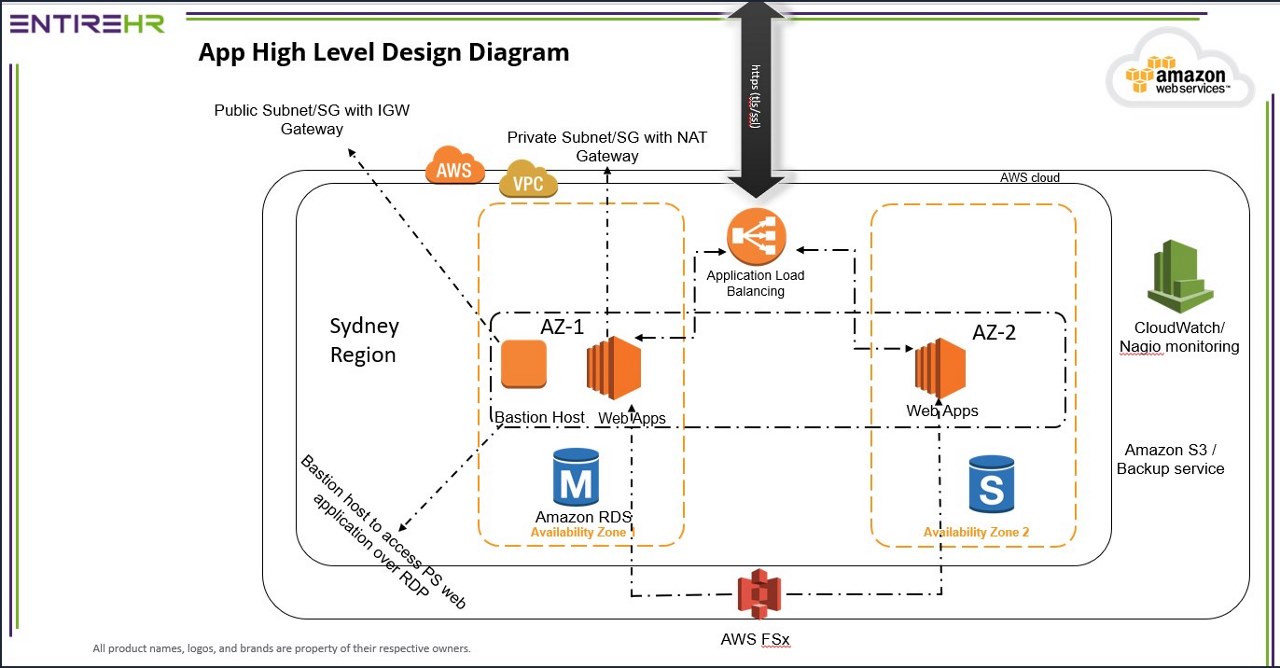
| Hosting Environment | AWS |
|---|---|
| Web Applications (Staff, Client & Apps) | Yes (Shared Machine) Windows 2019 |
| Win Applications (Finance) | Yes (Shared Machine) Windows 2019 |
| Database & SQL Version (Client Database) | RDS – Fully AWS Team Managed. Microsoft Standard SQL 2016 Version 15.0 |
| File System (Storage of documents) | Shared mounted file system Amazon FSx for Windows fully backed up by AWS Team |
| Hosting Location | Sydney, Australia |
| Multiple Datacentres in same state/country | Yes, Multi AZ Environment running on 3 data centres. If one data centre fail, then the second one will be in use within 1 minute. In last 14 years, it never happened in AWS history about all 3 data centres were down. |
| Multiple Datacentres in different state/country | Yes, but this feature is not available to Entire OnHire Clients. To avail this service, you will need to opt for Disaster Recovery option “Multi Region Active Active” option. Please see the details at the end of this document. |
| Entire OnHire Applications Backup Schedule | Default Strategy. Once a day at mid night full system back up. RPO: 6 Hours (Maximum loss of documents data in case of crash) |
| Entire OnHire Database Backup Schedule | RDS backup every 6 hours. RPO: 6 Hours (Maximum loss of data in case of crash) |
| Entire OnHire Files & Documents backup | File FSx every 6 hours. RPO: 6 Hours (Maximum loss of data in case of crash) |
| Single Point of Failure on a server | No (Multi AZ Environment – High availability) |
| Database Server Crash but not data centre – Loss of data & Recovery time SLA | Yes, Disaster Recovery is included in the default Entire OnHire Hosting. RTO: 60 Secs to 120 Secs as per AWS specifications. This may change which is outside our control. |
| Data centre Breaks down in the Region – Loss of data & Recovery time SLA | Multiple Data Centres in place within a Single Region. (Multi AZ Environment) If the complete region is down – all 3 data centres then there will be no disaster recovery in place. We will have to rely on AWS to restore the complete region or any one primary data centre. Please Note: There are options available at a fee to host the application in different country using a Disaster recovery option as shown as the end of the document. |
| Machine Operating System | Windows Servers 2019 |
| Disaster Recovery Options Available (Yes / No) | Yes |
| Load Balancers to keep the system performance stable | Yes |
| Standby Machine Access in case of a Single Machine Failure | Yes |
| Team managing Application hosting, backups, & Servers optimisation | Internal DevOps Team, AWS Business Support specialist & Fully managed Database service by AWS. |
Application Hosting – Included, Managed Service
Hosting Company Name – Amazon Web Services
| Hosting Environment | AWS |
|---|---|
| Software Applications (Staff, Members, Client Portals & Finance application) | Windows 2019 Server |
| Software Database (Single Tenant, Dedicated Database per Client) | RDS – Fully AWS Team Managed. Microsoft Standard SQL 2016 Version 15.0 |
| Hosting Location | Sydney, Australia |
| Multiple Datacentres in same state/country | Yes, there are 3 datacentres in Sydney where your application will be hosted. |
| Multiple Datacentres in different state/country | Not Included |
| Entire OnHire Applications Backup Schedule | Once a day at mid night full system back up. RPO: 6 Hours (Maximum loss of Default Strategy.) |
| Entire OnHire Database & Documents backup Schedule | Once a day at mid night full system back up. RPO: 6 Hours (Maximum loss of documents data in case of crash) |
| Database Server Crash but not data centre – Loss of data & Recovery time SLA | Yes, Disaster Recovery is included in the default Entire OnHire Hosting. RTO: 60 Secs to 120 Secs as per AWS specifications. This may change which is outside our control. |
| Data centre Breaks down in the Region – Loss of data & Recovery time SLA | Multiple Data Centres in place within a Single Region. (Multi AZ Environment) If the complete region is down – all 3 data centres then there will be no disaster recovery in place. We will have to rely on AWS to restore the complete region or any one primary data centre. Please Note: There are options available at a fee to host the application in different country using a Disaster recovery option as shown as the end of the document. |
| Additional Disaster Recovery Options Available (Yes / No) at a Cost | Yes, please talk to us. |
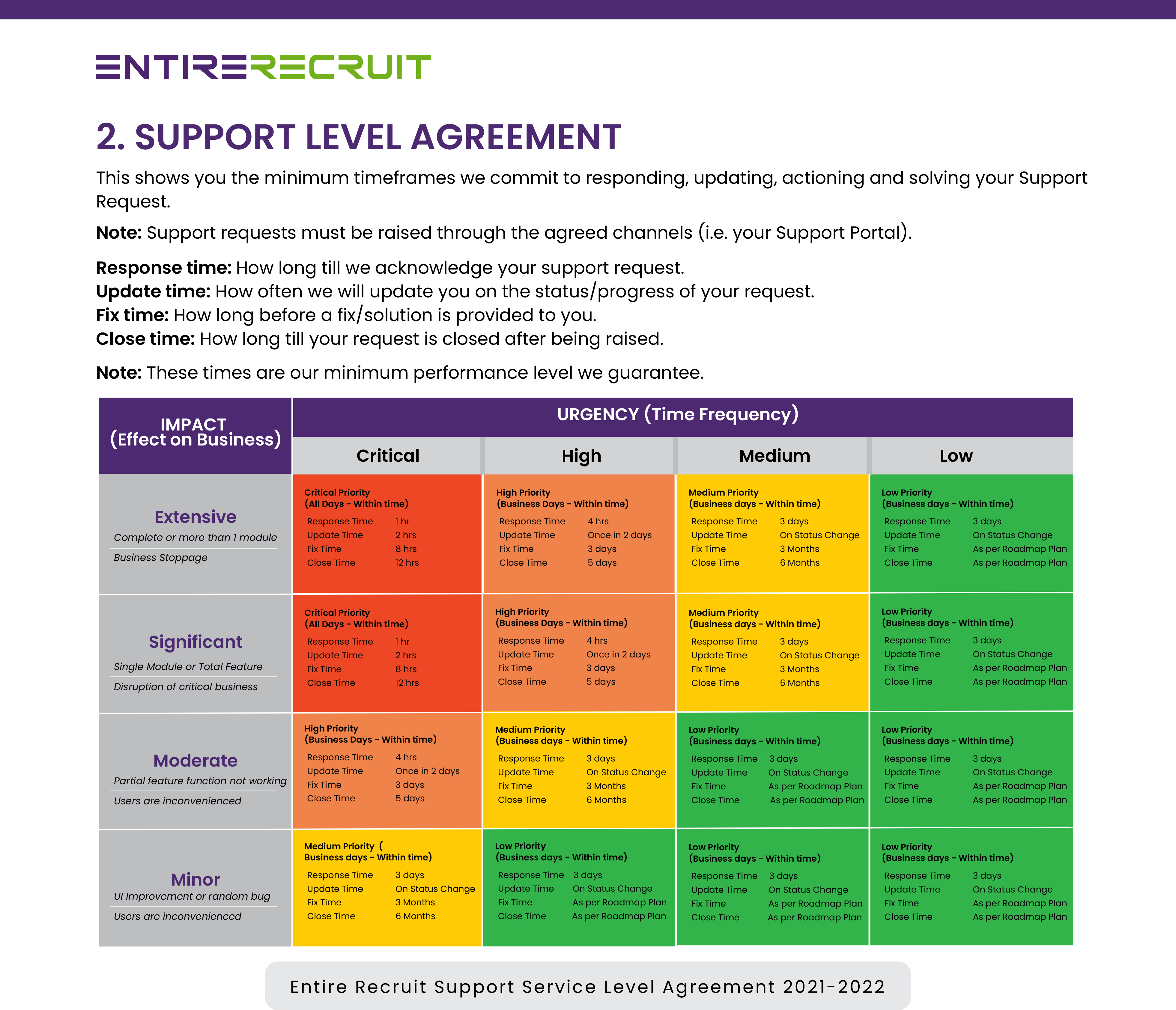
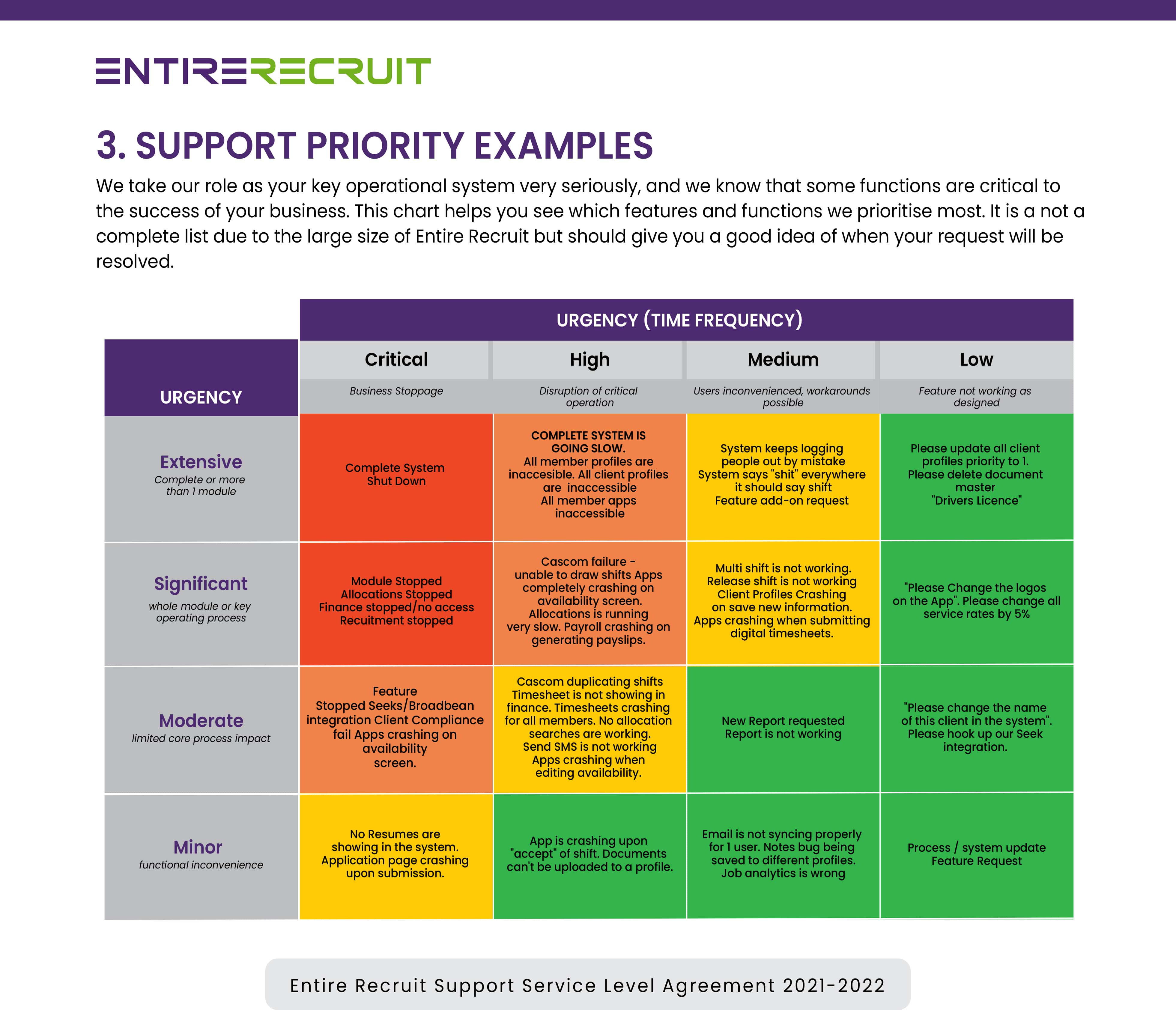
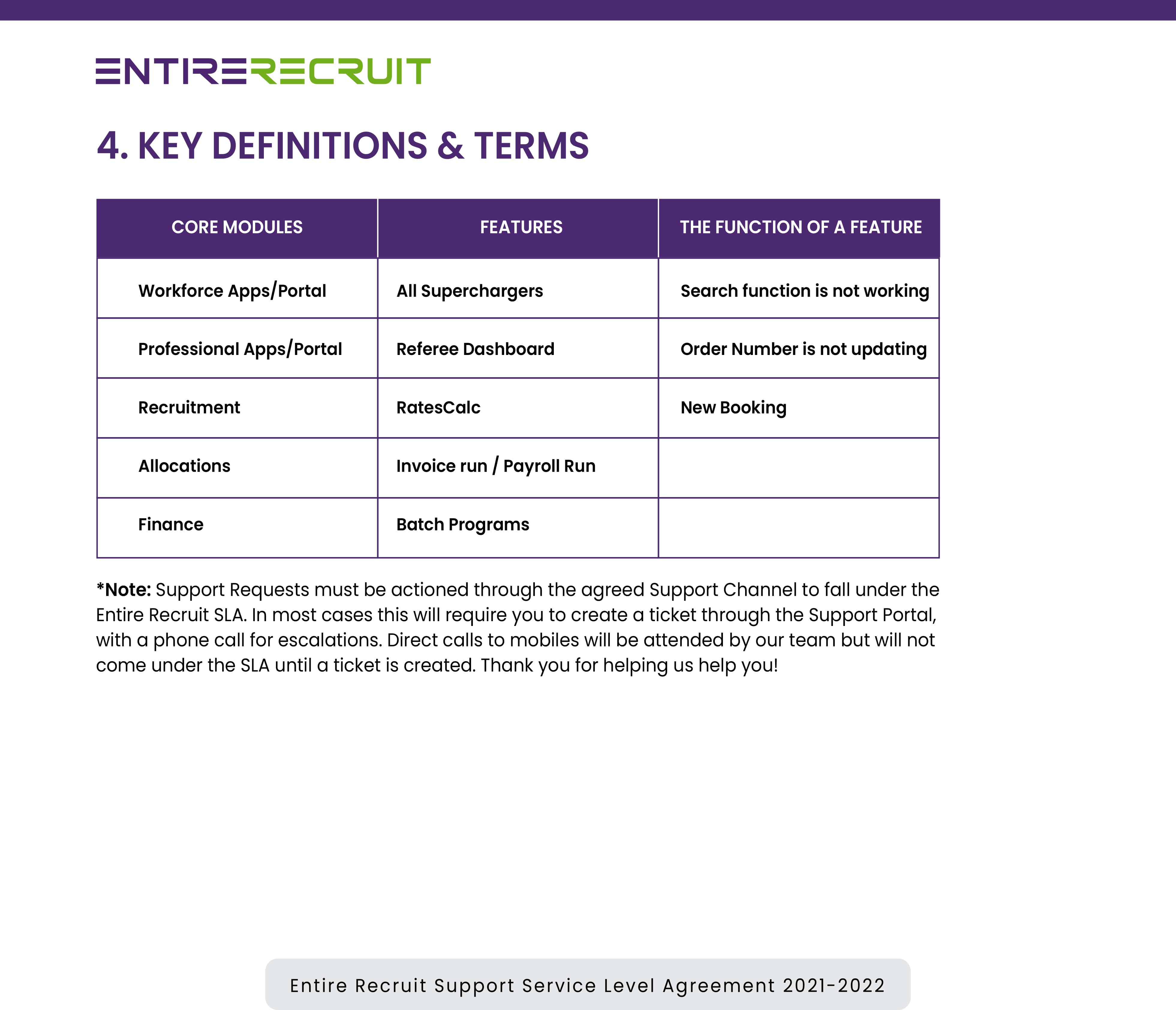
To avail payroll and invoicing option with licences less than 5, there is an option where you can share your ABN number to evaluate the interest and applicability of your monthly and additional charges using third party services.
Please note depending on what details you've processed through the system(still not sure if you did a live Payrun through the system) that Australian HR Laws and Fair Work Act requires you to maintain employee records (especially payroll details) for 5-7 years in case of any legal dispute or audits in the future.
There's a few ways you can manage this:
NOTE- if you go option 1 or 2 Entire is legally required to destroy all your data in doing so terminate our implied contract to store that data. Entire in this instance waiver all responsibility should Fair Work or any entity legally require any data required for future disputes, OH&S claims, tax etc.
FYI : The reason many companies keep an archived licence is it's not always certain what they might be asked to produce. It could be anything from an employee roster to a shift log to a timesheet.
This is not legal advice, you should seek your own legal and financial advice, rather this advice is common practice in HR/Payroll Software in Australia.
Fair work link here for reference - please let us know what you'd prefer us to do?
This is basically a ZOOM RESELLER licence
For clients that require the next level in technology to achieve their business strategy and want to operate with 1 platform. Entire offers a white glove “Enterprise” managed code service, which is a fully private, customized version of Entire OnHire exclusively your business, which includes the below:
*Please note this is only to clients with at 100+ licences and has a minimum expected development hours per month, additional hours for special projects will be invoiced additionally.
.| Stage # | Project Implementation Milestone |
|---|---|
| One | Contract Sign Application & Development Contract Terms |
| Two | Monthly Subscription Kick-off To Initiate the system setup & implementation process |
| Three | Pre-Client Onboarding Sales Handover, Kick-Off & System Launch File |
| Four |
Business Discovery Operations & Finance Deep Dives |
| Five | Feature Requirements Analysis Shifts Import Utility planning & Design specifications for Development Kick-off |
| Six |
Business Requirements BA Files, Exports, Extracts |
| Seven |
Skelton System Handover Data Migration Kick -off |
| Eight |
Data Validation & Import BA File Data, Member, Clients, Professionals, Contracts etc |
| Nine |
Final System Ready (Including data) ogins, Readiness Checklists, Final Checks |
| Ten |
Operations Training - Complete Front-end Recruitment, Allocations, Apps, Masters |
| Eleven |
Recruitment Go Live Jobs Release & Applicants Hiring Live |
| Twelve |
Version Release of Import Utility Development Delivery of new Import Program |
| Thirteen |
Finance Module Training & Test runs Payroll, Invoice, & Test Payroll runs |
| Fourteen |
Final Allocations & Finance Go Live Go Live |
| Fifteen |
Project Closure Priority Support 2 Weeks |
(Lianne, Tamara?) implementation consultants options
Click here our third party software partners
Delays in Go Live Allocations module from client: One-week additional time on top of 8 weeks will be included (Further delays in implementation will incur a weekly implementation cost of $1000 per week till allocation go live on top of monthly software subscription)
(email, phone, hours) for Sales, Support, Implementation, etc
Text is coming soon
Disaster recovery (DR) is an organization's ability to respond to and recover from an event that negatively affects business operations. The goal of DR methods is to enable the organization to regain use of critical systems and IT infrastructure as soon as possible after a disaster occurs.
There are 3 types of Disaster Recovery options which you choose from based on the RPO & RTO you would like to achieve that can minimize the risk on your business. The cost of each option will differ.
RPO, or Recovery Point Objective, is focused on data and your company’s loss tolerance in relation to your data. RPO is determined by looking at the time between data backups and the amount of data that could be lost in between backups.
RTO, or Recovery Time Objective, is the target time you set for the recovery of your IT and business activities after a disaster has struck. The goal here is to calculate how quickly you need to recover, which can then dictate the type or preparations you need to implement and the overall budget you should assign to business continuity.
The major difference between these two metrics is their purpose. The RTO is usually large scale, and looks at your whole business and systems involved. RPO focuses just on data and your company’s overall resilience to the loss of it.
Types of Disaster Recovery
| Backup and restore | Pilot light | Multi-region (multi-site) active-active |
|---|---|---|
| (Current Hosting State): Back up your data and applications using backups into the DR Region. Restore this data when necessary to recover from a disast | (Reduce RPO & RTO Metrics): Replicate your data from one region to another and provision a copy of your core workload infrastructure. Resources required to support data replication and backup such as databases and object storage are always on. Other elements such as application servers are loaded with application code and configurations but are switched off and are only used during testing or when Disaster Recovery failover is invoked. | (RPO near zero, RTO potentially zero, Hosting in different country): Your workload is deployed to, and actively serving traffic from, multiple AWS Regions. This strategy requires you to synchronize data across regions. Possible conflicts caused by writes to the same record in two different regional replicas must be avoided or handled. Data replication is useful for data synchronization and will protect you against some types of disaster, but it will not protect you against data corruption or destruction unless your solution also includes options for point-in-time recovery. |
| To avail of this option, the indicative additional hosting fee would cost around 15% to 18% on your monthly bill or minimum amount of $900 if the additional monthly amount is lower than $900. Maximum loss | To avail of this option, the indicative additional hosting fee would cost around 40% to 45% on your monthly bill or a minimum amount of $3,000 if the additional monthly amount is lower than $3,000. | |
| RPO Metric: 6 Hours | RPO Metric: Nearly 0 Hours Maximum data loss as per AWS Specification | |
| RTO Metric: Within Six hours | RTO Metric: Within 10 Mins (Auto Switch of traffic routing after 3 occurrences of failure) |
The process of a client requesting a new feature or enhancement for development consideration is:
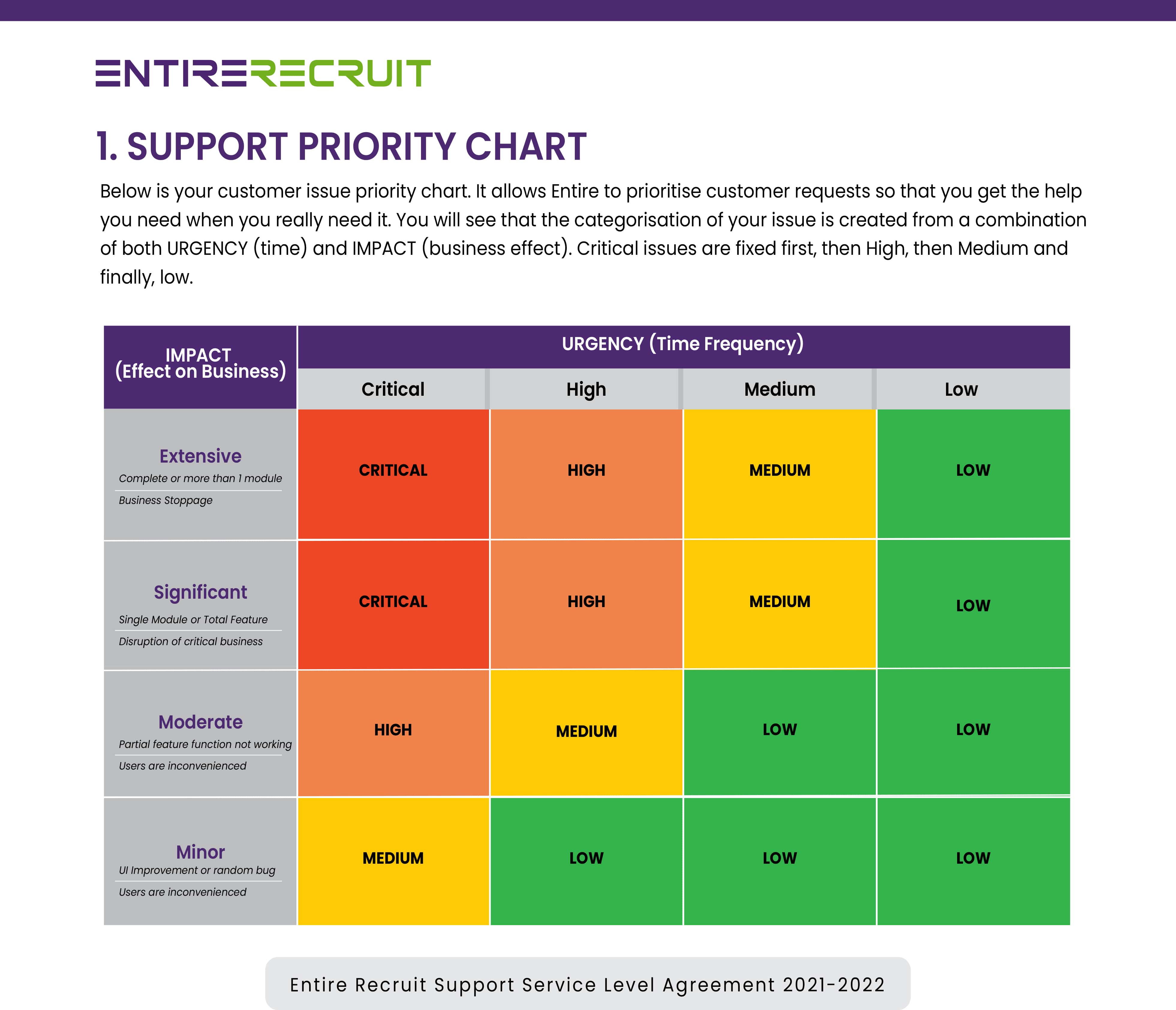
Step 1: Quick analysis of the request to ascertain the feature enhancement Priority. By default, all product feature enhancements are of "Low" priority.
Step 2: Ascertain Development Strategy: After the analysis of a requested feature within a month of receiving the request, we ascertain if the requested feature is aligned with the product development strategy.
Step 3: Quarterly Assessment: If the requested feature is aligned after the initial analysis, then the further Quarterly assessment from the product team occurs to ascertain the feature requirements & benefits analysis.
Step 4: Development Timeframe: After the Quarterly assessment, if the requested feature has been approved for the development, then the client gets notified with the details of the expected development timeframe. 99% of the suggestions fall under the category of "Low" Priority as per our roadmap plan & will have the minimum development kick-off timeframe of 18 months to 2 years. Please note: We don't give the release date of the feature at this stage as it is too difficult to estimate the date.
The details include :
Priority: Medium (Around one year), Low (Around 2 years)
Estimated Development Timeframe: Date Period
Reason of approval: Benefits
Standard pricing consists of 2 parts I.e. one time implementation and per user licence. There are 4 options available:
| Options | Inclusions | Details |
|---|---|---|
| Standard Pricing | No Superchargers | Includes Implementation & Monthly Subscription with 5% Indexation annually |
| No Term Contract | Includes Implementation, Superchargers & Monthly Subscription | 5% Indexation annually |
| Subscription Term Contract | Superchargers with Paid Implementation upfront | 3 Year - 2.5% Indexation or 5 Year - 0% Indexation |
| Subscription & set up term Contract | Superchargers with Monthly Subscription | 3 Year - 2.5% Indexation or 5 Year - 0% Indexation |
Entire is currently building out a dedicated Client Management program which includes dedicated client managers including routine meeting schedules. This tailored client service feature will be at a tiered expense.
| Standard | Mid | Premium | Elite |
|---|---|---|---|
| $0 | $900 Per month | $2200 Per month | $5000 |
| Included in standard subscription | All in standard | All in Mid-level | All in premium |
| Annual system upgrade free of charge | Dedicated account manager (junior) | Dedicated account manager (senior) | Senior executive level account manager (CEO, CTO, Client Engagement Manager) |
| Group Walkthrough of recent version updates Q & A – 30 minutes | Fortnightly 1hr (Zoom) client engagement session with account manager | Fortnightly 1hr (Zoom) client engagement session | Optional Monthly face to face meeting in client office/space $2,500.00 (note travel & accommodation expenses may apply) |
| Webinars | Review of current support tickets | System operations | |
| In system tips, help, hints & process step throughs | General feedback, system requests & process updates | Process review | |
| Issues and help via support portal and ticketing process | Highlight feature requests and system improvements | Support ticket review & resolutions | |
| Annual system review | Bi-annual system review & optimisation session (2hrs - Zoom) with account manager review of system and processes to highlight current capacity and highlight potential system & process efficiency gains | Optional Monthly face to face meeting in client office/space $1750.00 (note travel & accommodation expenses may apply) | |
| Review of development roadmap & future product concepts and development | |||
| Provide direct feedback on current system features, future development features |
Additional options - applicable for all support levels upon availability
| 1 Zoom & Training sessions: | Investment |
|---|---|
| Level 1 Support consultant- | $100/hr |
| Level 2 Support consultant- | $150/hr |
| Account manager (junior)- | $200/hr |
| Technical support specialist (e.g finance) | $350/hr |
| Senior account manager | $450/hr |
| Executive level | $750/hr |
| 2 Priority Support | |
|
Level 1
|
$500/week |
|
Level 2
|
$750/week |
|
Level 3
|
$1000/week |
| 3. Cappa Client Feature | |
|
$2500 / feature |
Note all prices listed above are GST exclusive
Content is coming soon...
| i. IT Support & Training | Description | Rate |
|---|---|---|
| Business Hours Support | Phone / Remote Access (prescheduled only) | Free |
| Silver Service Level Agreement | Free | |
| 24/7 Support via Integrated Support Portal | Free | |
| Calls (ad hoc) | Outside Business Hours Support by Phone / Remote Access* | $140 -Per Call |
| Training | $250-Per hour | |
| Customer Lifetime Access to Training Videos | (Recorded during your training) | Free |
| Dedicated Account Manager Mobile 24/7 | $* -Per Agreement | |
| ii. Third Party Software Services & APIs*** | ||
| ii. a. Required (included with every Entire OnHire subscription) | ||
| PNS Push Notification Service | Unlimited messages | Free |
| SSL Security Certificate | HTTPS certificate for all URLs | Free |
| Google Maps API | (Note free account but very high usage charged by GOOGLE) | Free up to $200 usage monthly |
| ii. b. Optional (Charged per usage or set-up. See SCHEDULE 3 for full volume pricing). | ||
| SMS Short Message Service | Integration of SMS text messages through Entire OnHire | $*Per Schedule 3 |
| VISA –Integration with Vevo database | For automation and upload into Entire OnHire | $*Per Schedule 3 |
| iii. Enterprise Multiple ABN Entities & Custom Corporate Branding Options | ||
| Set Up fee for corporate branding domain URL | $1900 -Per ABN | |
| Daily fee for additional database hosting, maintenance and support +6% -Per Day x ABN | ||
| Set Up Fee for corporate branding domain URL | $7500 -Once off | |
| Daily fee for corporate branding domain URL | +9% -Per Day | |
| Corporate branding: Entire OnHire web portals Them Customisation | $2900 -Once off | |
| Corporate branding: Apple Apps + Apple Account + Theme Customisation | $8800 -Per Annum | |
| Corporate branding: Android Apps + Android Account + Theme Customisation | $8800 -Per Annum | |
| (Corporate branded apps will be on Apple App Store & Android Play Store Accounts) **** | ||
| iv. Guaranteed Compatible Identification Card Printer*** | ||
| Evolis Printer Double Sided | $2,900 -Per Unit | |
| Cards & Ink as per specifications | As Requested, | |
| v. Agreed Program Customisation | ||
| Program customisation management / architecture / coding | $175 -Per Hour | |
| vi. 100% Money-back Go Live Express | ||
| System Set Up, Data Migration and Settings configuration ready for Go Live Date | $* Per Project |
These are per usage APIs. Credit packs are purchased via the store directly from Entire via the store: https://store.entiresoftware.com/
| SMS MESSAGING | Per Unit | Unit Quantity | Total Inv |
|---|---|---|---|
| $0.13 | 1000 | $130 | |
| $0.12 | 2500 | $300 | |
| $0.11 | 5000 | $550 | |
| $0.10 | 10000 | $1,000 | |
| $0.09 | 20000 | $1,800 | |
| $0.08 | 40000 | $3,200 | |
| $0.07 | 75000 | $5,250 | |
| $0.06 | 160000 | $9,600 | |
| VISA VEVO API | Per Unit | Unit Quantity | Total Inv |
| $3.50 | 100 | $350 | |
| $2.90 | 500 | $1,450 | |
| $2.50 | 1000 | $2,500 | |
| $1.90 | 5000 | $9,500 | |
*Entire will never charge a support fee for critical issues, i.e., system down or total loss of core functionality.
**Interstate visits to Client Premises require accommodation (can be provided by Client) and economy flights with Virgin or Qantas
***Third Party Software including API’s, Account Registrations and Hardware rates are subject to market variations
****Apps on App store are subject to Apple & Android Approval for publication and as such cannot be guaranteed
Your Entire OnHire Implementation is guaranteed to your success, is all-inclusive and delivered over one continuous 3-month period*, which starts upon payment of your licencing subscription or implementation setup fee.
| IMPLEMENTATION SERVICE | DESCRIPTION |
|---|---|
| Kick-off meeting | Meeting between your key stakeholders and the Entire OnHire client team including Directors |
| Priority Support | Dedicated phone number and personal key contact during your implementation period |
| Business Analysis | Several in-depth meetings to analyse your current software, company processes and key goals |
| Project Design | Detailed and customised step by step software implementation plan after requirements and analysis |
| Project Management | Key contact dedicated to implementation of your project plan accountable for hitting your milestones |
| Software Workshops | Ongoing configuration workshops run over the implementation period with your key stakeholders |
| Cloud & Database Engineering | Creation of your Entire OnHire system including cloud architecture design |
| Third Party Account Management | Account creation with included third parties such as Google Maps, Apple, SMS and Email services* |
| Software User Training | 10 hours base multiple by 2 for every extra user licence you purchase. (2 users = 12 hours) |
| Candidate Data Migration | All candidate data that can be imported via excel sheet or accessed or your database* |
| Client Data Migration | All active Client data that can be imported via excel sheet or accessed or your database* |
| Financial Data Migration | All active payroll and invoicing rates that can be imported via excel sheet or your database* |
| Financial Consultation | Expert Australian payroll & accounting consultation to ensure system is configured compliantly |
| Payroll & Invoice Testing | Parallel Payroll and Invoice test pay runs performed to ensure a smooth transition period |
| Gold Priority Support | Dedicated phone number and personal key contact during your implementation period |
| Post Launch Review | A feedback session performed post implementation with your Customer Advocacy Manager |
Set Up Fee – The initial Set Up fee (Depends upon your pricing plan), includes your initial user and admin level training, importing all of your core Client, Candidate, Payroll & Invoicing data including awards, rebranding customisation, hardware set-up, initial and ongoing strategy implementation session/s with Entire OnHire business analyst/s (which may be onsite or online).
| Set Up Includes | Set Up Services – Additional services included |
|---|---|
|
The Set Up Services below are included in the Set-Up fee for a 3-month period only*. This starts once your monthly licencing subscription starts, usually 6-12 weeks before your agreed “Full Go Live” date. After this period all additional set-up services will be billed as per Schedule TWO.
|
*This time period may be extended at request of the client for larger company implementations, before signing the agreement. For more information on service level agreements please ask your Entire OnHire representative.
**Active is defined as Clients or Members who are marked as active in your current database. Non active Client and Members can be imported at an additional Investment.
***Items like resumes, uploaded documents, images may be able to be imported as well. This is an additional charge to the normal included set-up and is quoted per project, as every database is different. Please ask us if you would like Entire to also do this for you, as your current software may not support or in some cases will restrict Entire’s ability to do so, hence we assess every database individually.
****Note if client is the cause for delays and implementations extend past the expected live date the client will be invoiced additional project management services at $600 per day until the project is closed.
Content is coming soon..
| Hosting Environment | AWS |
|---|---|
| Web Applications (Staff, Client & Apps) | Yes (Shared Machine) Windows 2019 |
| Win Applications (Finance) | Yes (Shared Machine) Windows 2019 |
| Database & SQL Version (Client Database) | RDS – Fully AWS Team Managed. Microsoft Standard SQL 2016 Version 15.0 |
| File System (Storage of documents) | Shared mounted file system Amazon FSx for Windows fully backed up by AWS Team |
| Hosting Location | Sydney, Australia |
| Multiple Datacentres in same state/country | Yes, Multi AZ Environment running on 3 data centres. If one data centre fail, then the second one will be in use within 1 minute. In last 14 years, it never happened in AWS history about all 3 data centres were down. |
| Multiple Datacentres in different state/country | Yes, but this feature is not available to Entire OnHire Clients. To avail this service, you will need to opt for Disaster Recovery option “Multi Region Active Active” option. Please see the details at the end of this document. |
| Entire OnHire Applications Backup Schedule | Default Strategy. Once a day at mid night full system back up. RPO: 6 Hours (Maximum loss of documents data in case of crash) |
| Entire OnHire Database Backup Schedule | RDS backup every 6 hours. RPO: 6 Hours (Maximum loss of data in case of crash) |
| Entire OnHire Files & Documents backup | File FSx every 6 hours. RPO: 6 Hours (Maximum loss of data in case of crash) |
| Single Point of Failure on a server | No (Multi AZ Environment – High availability) |
| Database Server Crash but not data centre – Loss of data & Recovery time SLA | Yes, Disaster Recovery is included in the default Entire OnHire Hosting. RTO: 60 Secs to 120 Secs as per AWS specifications. This may change which is outside our control. |
| Data centre Breaks down in the Region – Loss of data & Recovery time SLA | Multiple Data Centres in place within a Single Region. (Multi AZ Environment) If the complete region is down – all 3 data centres then there will be no disaster recovery in place. We will have to rely on AWS to restore the complete region or any one primary data centre. Please Note: There are options available at a fee to host the application in different country using a Disaster recovery option as shown as the end of the document. |
| Machine Operating System | Windows Servers 2019 |
| Disaster Recovery Options Available (Yes / No) | Yes |
| Load Balancers to keep the system performance stable | Yes |
| Standby Machine Access in case of a Single Machine Failure | Yes |
| Team managing Application hosting, backups, & Servers optimisation | Internal DevOps Team, AWS Business Support specialist & Fully managed Database service by AWS. |
Application Hosting – Included, Managed Service
Hosting Company Name – Amazon Web Services
| Hosting Environment | AWS |
|---|---|
| Software Applications (Staff, Members, Client Portals & Finance application) | Windows 2019 Server |
| Software Database (Single Tenant, Dedicated Database per Client) | RDS – Fully AWS Team Managed. Microsoft Standard SQL 2016 Version 15.0 |
| Hosting Location | Sydney, Australia |
| Multiple Datacentres in same state/country | Yes, there are 3 datacentres in Sydney where your application will be hosted. |
| Multiple Datacentres in different state/country | Not Included |
| Entire OnHire Applications Backup Schedule | Once a day at mid night full system back up. RPO: 6 Hours (Maximum loss of Default Strategy.) |
| Entire OnHire Database & Documents backup Schedule | Once a day at mid night full system back up. RPO: 6 Hours (Maximum loss of documents data in case of crash) |
| Database Server Crash but not data centre – Loss of data & Recovery time SLA | Yes, Disaster Recovery is included in the default Entire OnHire Hosting. RTO: 60 Secs to 120 Secs as per AWS specifications. This may change which is outside our control. |
| Data centre Breaks down in the Region – Loss of data & Recovery time SLA | Multiple Data Centres in place within a Single Region. (Multi AZ Environment) If the complete region is down – all 3 data centres then there will be no disaster recovery in place. We will have to rely on AWS to restore the complete region or any one primary data centre. Please Note: There are options available at a fee to host the application in different country using a Disaster recovery option as shown as the end of the document. |
| Additional Disaster Recovery Options Available (Yes / No) at a Cost | Yes, please talk to us. |
To avail payroll and invoicing option with licences less than 5, there is an option where you can share your ABN number to evaluate the interest and applicability of your monthly and additional charges using third party services.
Please note depending on what details you've processed through the system(still not sure if you did a live Payrun through the system) that Australian HR Laws and Fair Work Act requires you to maintain employee records (especially payroll details) for 5-7 years in case of any legal dispute or audits in the future.
There's a few ways you can manage this:
NOTE- if you go option 1 or 2 Entire is legally required to destroy all your data in doing so terminate our implied contract to store that data. Entire in this instance waiver all responsibility should Fair Work or any entity legally require any data required for future disputes, OH&S claims, tax etc.
FYI : The reason many companies keep an archived licence is it's not always certain what they might be asked to produce. It could be anything from an employee roster to a shift log to a timesheet.
This is not legal advice, you should seek your own legal and financial advice, rather this advice is common practice in HR/Payroll Software in Australia.
Fair work link here for reference - please let us know what you'd prefer us to do?
This is basically a ZOOM RESELLER licence
For clients that require the next level in technology to achieve their business strategy and want to operate with 1 platform. Entire offers a white glove “Enterprise” managed code service, which is a fully private, customized version of Entire OnHire exclusively your business, which includes the below:
*Please note this is only to clients with at 100+ licences and has a minimum expected development hours per month, additional hours for special projects will be invoiced additionally.
.| Stage # | Project Implementation Milestone |
|---|---|
| One | Contract Sign Application & Development Contract Terms |
| Two | Monthly Subscription Kick-off To Initiate the system setup & implementation process |
| Three | Pre-Client Onboarding Sales Handover, Kick-Off & System Launch File |
| Four |
Business Discovery Operations & Finance Deep Dives |
| Five | Feature Requirements Analysis Shifts Import Utility planning & Design specifications for Development Kick-off |
| Six |
Business Requirements BA Files, Exports, Extracts |
| Seven |
Skelton System Handover Data Migration Kick -off |
| Eight |
Data Validation & Import BA File Data, Member, Clients, Professionals, Contracts etc |
| Nine |
Final System Ready (Including data) ogins, Readiness Checklists, Final Checks |
| Ten |
Operations Training - Complete Front-end Recruitment, Allocations, Apps, Masters |
| Eleven |
Recruitment Go Live Jobs Release & Applicants Hiring Live |
| Twelve |
Version Release of Import Utility Development Delivery of new Import Program |
| Thirteen |
Finance Module Training & Test runs Payroll, Invoice, & Test Payroll runs |
| Fourteen |
Final Allocations & Finance Go Live Go Live |
| Fifteen |
Project Closure Priority Support 2 Weeks |
(Lianne, Tamara?) implementation consultants options
Click here our third party software partners
Delays in Go Live Allocations module from client: One-week additional time on top of 8 weeks will be included (Further delays in implementation will incur a weekly implementation cost of $1000 per week till allocation go live on top of monthly software subscription)
(email, phone, hours) for Sales, Support, Implementation, etc
Text is coming soon
Disaster recovery (DR) is an organization's ability to respond to and recover from an event that negatively affects business operations. The goal of DR methods is to enable the organization to regain use of critical systems and IT infrastructure as soon as possible after a disaster occurs.
There are 3 types of Disaster Recovery options which you choose from based on the RPO & RTO you would like to achieve that can minimize the risk on your business. The cost of each option will differ.
RPO, or Recovery Point Objective, is focused on data and your company’s loss tolerance in relation to your data. RPO is determined by looking at the time between data backups and the amount of data that could be lost in between backups.
RTO, or Recovery Time Objective, is the target time you set for the recovery of your IT and business activities after a disaster has struck. The goal here is to calculate how quickly you need to recover, which can then dictate the type or preparations you need to implement and the overall budget you should assign to business continuity.
The major difference between these two metrics is their purpose. The RTO is usually large scale, and looks at your whole business and systems involved. RPO focuses just on data and your company’s overall resilience to the loss of it.
Types of Disaster Recovery
| Backup and restore | Pilot light | Multi-region (multi-site) active-active |
|---|---|---|
| (Current Hosting State): Back up your data and applications using backups into the DR Region. Restore this data when necessary to recover from a disast | (Reduce RPO & RTO Metrics): Replicate your data from one region to another and provision a copy of your core workload infrastructure. Resources required to support data replication and backup such as databases and object storage are always on. Other elements such as application servers are loaded with application code and configurations but are switched off and are only used during testing or when Disaster Recovery failover is invoked. | (RPO near zero, RTO potentially zero, Hosting in different country): Your workload is deployed to, and actively serving traffic from, multiple AWS Regions. This strategy requires you to synchronize data across regions. Possible conflicts caused by writes to the same record in two different regional replicas must be avoided or handled. Data replication is useful for data synchronization and will protect you against some types of disaster, but it will not protect you against data corruption or destruction unless your solution also includes options for point-in-time recovery. |
| To avail of this option, the indicative additional hosting fee would cost around 15% to 18% on your monthly bill or minimum amount of $900 if the additional monthly amount is lower than $900. Maximum loss | To avail of this option, the indicative additional hosting fee would cost around 40% to 45% on your monthly bill or a minimum amount of $3,000 if the additional monthly amount is lower than $3,000. | |
| RPO Metric: 6 Hours | RPO Metric: Nearly 0 Hours Maximum data loss as per AWS Specification | |
| RTO Metric: Within Six hours | RTO Metric: Within 10 Mins (Auto Switch of traffic routing after 3 occurrences of failure) |
The process of a client requesting a new feature or enhancement for development consideration is:
Step 1: Quick analysis of the request to ascertain the feature enhancement Priority. By default, all product feature enhancements are of "Low" priority.
Step 2: Ascertain Development Strategy: After the analysis of a requested feature within a month of receiving the request, we ascertain if the requested feature is aligned with the product development strategy.
Step 3: Quarterly Assessment: If the requested feature is aligned after the initial analysis, then the further Quarterly assessment from the product team occurs to ascertain the feature requirements & benefits analysis.
Step 4: Development Timeframe: After the Quarterly assessment, if the requested feature has been approved for the development, then the client gets notified with the details of the expected development timeframe. 99% of the suggestions fall under the category of "Low" Priority as per our roadmap plan & will have the minimum development kick-off timeframe of 18 months to 2 years. Please note: We don't give the release date of the feature at this stage as it is too difficult to estimate the date.
The details include :
Priority: Medium (Around one year), Low (Around 2 years)
Estimated Development Timeframe: Date Period
Reason of approval: Benefits